Vantra AI

An assistant that reads your workspace.

Vantra AI is grounded in your live projects and tasks — not a generic chatbot. Ask what's at risk, plan your day, turn a brief into a task list, and keep everyone updated.

Grounded in your work

Not a chatbot bolted on — a co-pilot that knows your projects

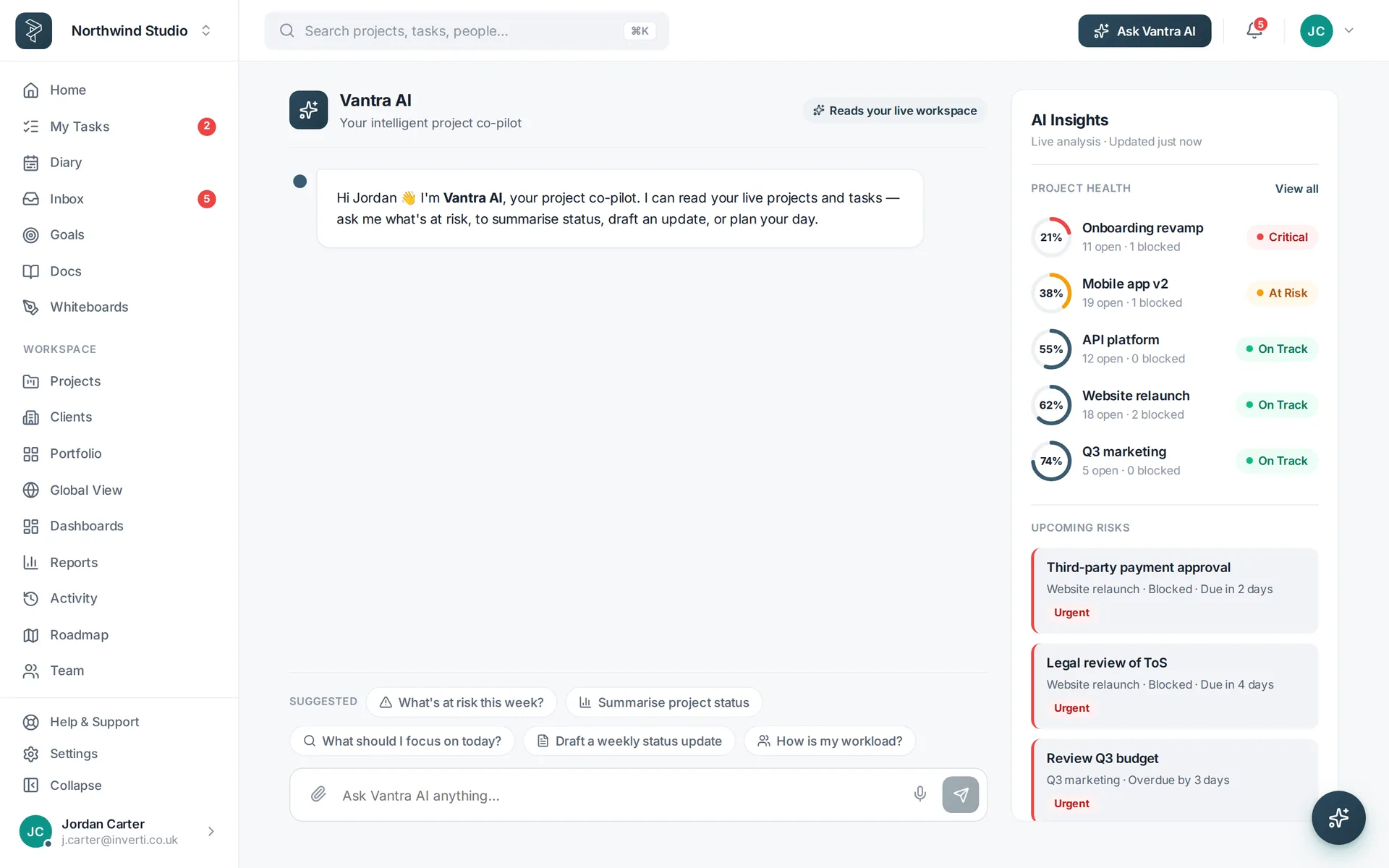
Vantra AI reads your live workspace: projects, tasks, due dates, health and your own open work. Ask it anything and the answer is about your plan, not the internet's.

  • "What's at risk this week?" — ranked, with the reason each item is flagged
  • "Plan my day" — a time-blocked schedule that respects your capacity
  • "Summarise project status" — a stakeholder-ready update in seconds
Try Vantra AI free M5 12h14M13 6l6 6-6 6
The Vantra AI co-pilot with suggested prompts and an AI Insights rail of project health and risks.
Nine ways AI does the busywork

From a sentence to a schedule

Every one is grounded in your live workspace. Add an OpenAI key in settings to switch them on.

Ask Vantra AI

A chat co-pilot that streams answers grounded in your live projects, tasks and health.

Plan My Day

Turns your open tasks into a time-blocked, capacity-aware schedule.

AI Quick Add

Type a task in plain English; it fills in assignee, priority and due date.

AI Spec Import

Drop in a PDF or brief and get structured tasks, grouped into epics to review.

AI Describe & Subtasks

Draft or improve a description, or suggest a sensible set of subtasks.

AI Action Items

Turn sprint and retro notes into real tasks with owners and priorities.

AI Find & Search

Semantic search across every project — find work by meaning, with reasons why.

Risk scan

Flags the tasks most likely to slip this week, each with a reason.

Status summaries

Draft a weekly status update or summarise a project in a sentence.

How it works

Put Vantra AI to work in three steps

Add your OpenAI key

Switch AI on in Settings — the rest of the app works with or without it.

Ask about your work

“What's at risk?”, “plan my day”, “summarise status” — grounded in your live projects.

Review and apply

Vantra AI proposes tasks and edits; you approve before anything changes.

FAQ

Questions about Vantra AI

Is Vantra AI just a generic chatbot?

No. It's grounded in your live workspace — your projects, tasks, due dates and health — so answers are about your plan, not the internet's.

What do I need to switch it on?

An OpenAI key configured in settings. Until it's set up, AI features degrade gracefully with a clear message.

Does it change my data automatically?

It proposes; you review. Generated tasks, subtasks and edits are shown for you to confirm before anything is created.

What can it actually do?

Plan your day, quick-add tasks from plain English, import a spec into tasks, draft descriptions and subtasks, turn notes into action items, search by meaning, scan for risk and summarise status.

Let Vantra AI handle the busywork.

Plan your day, quick-add tasks from plain English, and flag risk before it bites — grounded in your real work.

Vantra Projects